Software

Everything you need to plan, drive and invoice containers

TEUsoft is built for container haulage: files per container, a planning board that shows the day and invoicing that calculates with the rates you agreed with your customer.

Tablet and phone

Plan wherever you are

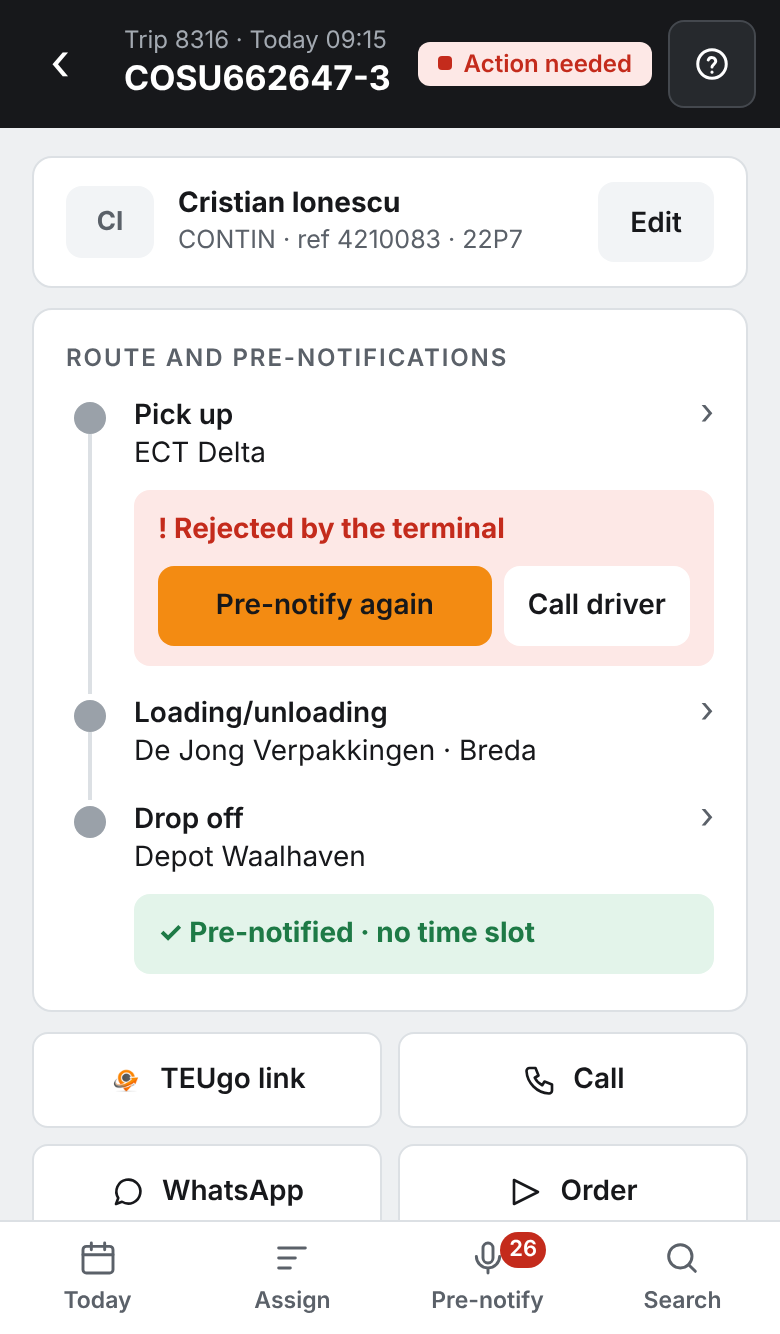
The same site, on PC, tablet and phone. The mobile planner does everything you need on the road, and whatever a colleague changes you see immediately.

  • Assign trips
    Drag or tap a trip to a driver, subcontractor or another day.
  • Assign driver or subcontractor
    Instantly visible to your colleagues, without refreshing.
  • Pre-announce
    Pre-announce containers at the terminal, from anywhere.
  • Documents
    View CMR, weighbridge ticket and photos with the file.
  • Send order
    Via WhatsApp or as PDF, with the CMR attached.
  • TEUgo status
    See what the driver has filled in and what's done.
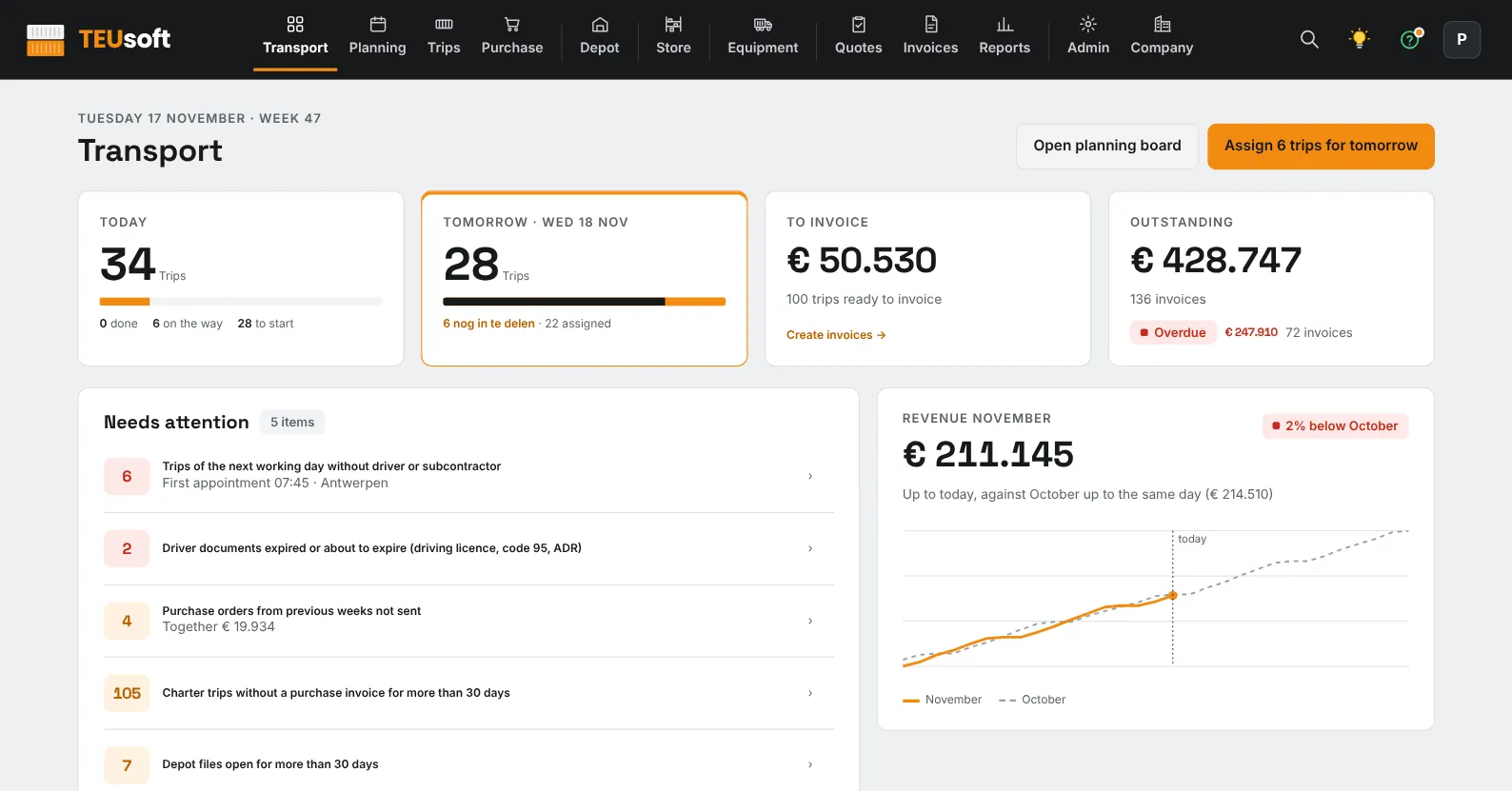
The TEUsoft dashboard on a tablet
A trip in the mobile planner

Planning board

The whole day on one screen. Open trips at the top, assigned trips with their driver or subcontractor. You see at a glance where a trip is still unmanned.
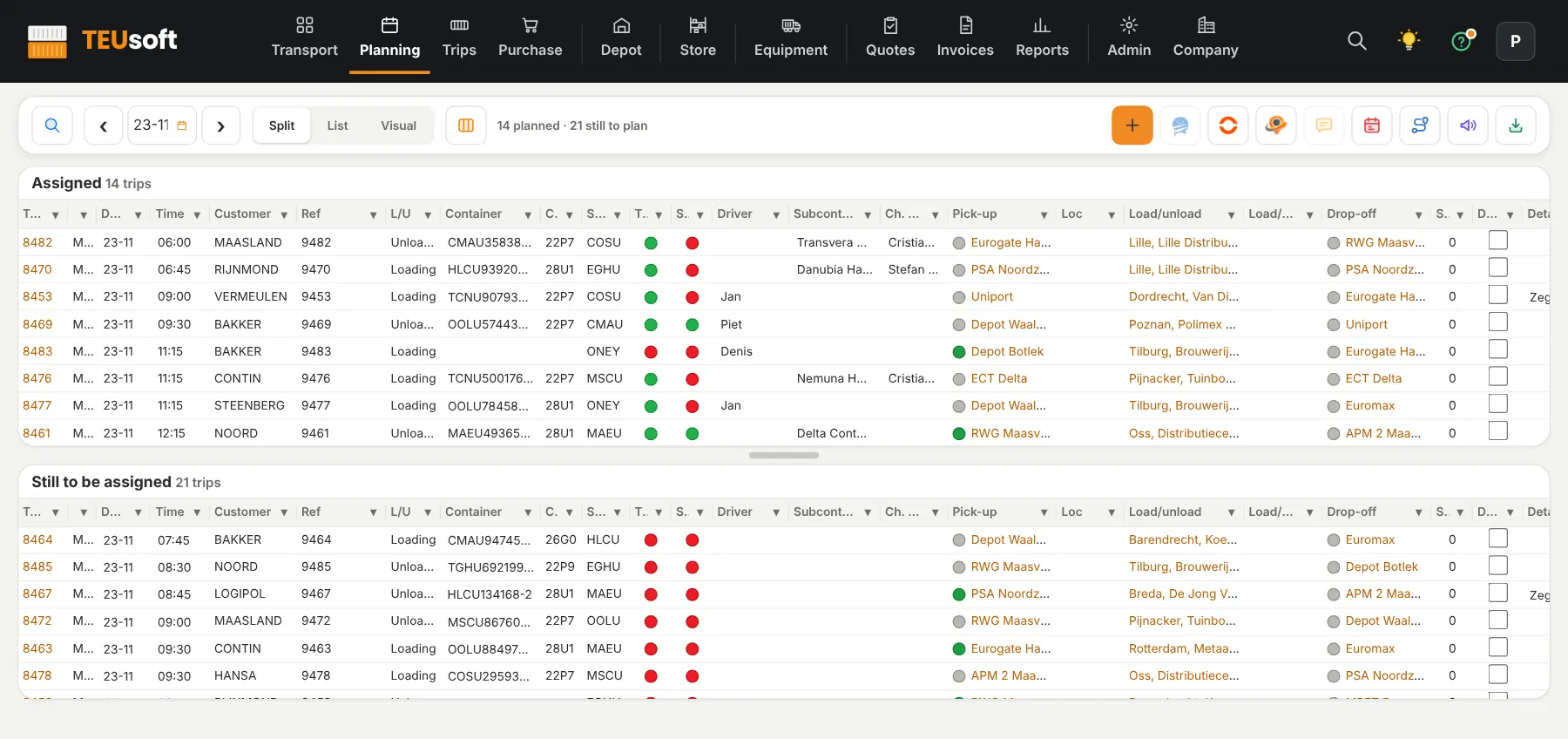
  • Drag to a driver, subcontractor or another day
  • Status per trip, with a symbol instead of colour alone
  • Send straight to TEUgo
The planning board with today's assigned trips and the trips still to be assigned

Screens from the demo environment, with fictional data.

Trip 13483 · ONEU-182296-0
1 Pick-up — RWGTAR 3938727 · completed
2 Unloading — Schouten PolsbroekExpected 14:00
3 Drop-off — Kramer / DCSTime slot 18:00 – 23:59

One file per container

Pick-up, loading or unloading and drop-off are listed as steps of the trip. References, TAR codes, time slots and documents are right there, so nobody has to search or call.

  • Search by trip number, container, reference or customer
  • Split and link trips
  • ADR details on their own tab

Invoicing that does the maths

Per customer you record what a trip costs: fixed rate, per kilometre, per tonne or per hour. Surcharges, waiting hours and tolls are included automatically, so your invoice matches what was driven.

  • Rates and surcharges per customer and per subcontractor
  • Result per trip, before you invoice
  • Export to your accounting
Result trip 13482
RevenueCustomer rate
CharterPurchase price
Result 6,2%
Margin below your 10% threshold

Find everything with one bar

Press Ctrl+K and type. TEUsoft searches trips, containers, customers, drivers, subcontractors, number plates and invoices at once. If there's just one hit, the trip opens immediately. You can also search the archive.

  • One search bar for everything, on PC and phone
  • Straight to the trip on a single hit
  • Search the archive without another screen
Search · Ctrl+K
ONEU-182296
ONEU-182296-0trip 13483Trip
Kees HoldriverDriver
73BVD2number plateNumber plate
Trip 13483 · rate
No rate in this trip
Agreement found for this customer: fixed rate per trip, plus waiting hours.
Apply agreement

Never a trip without a rate again

If a trip has no rate, TEUsoft flags it immediately and shows the price agreement with the customer. One click applies it. When marking the trip as done, TEUsoft asks once more, so nothing slips through to the invoice.

  • Price agreement per customer at your fingertips
  • Waiting hours are calculated and billed automatically
  • Automatic VAT and invoice checks

Drag orders in, done

Drag your shipper's file onto the screen. TEUsoft recognises the customer by their external code and creates one file per container. No retyping, so no typos either.

  • Dedicated imports for your shippers' files: Excel, CSV and XML
  • API integrations with various systems, from various shippers
  • Orders by email or PDF? AI reads the order and gets it ready in TEUsoft — in partnership with Chainfill
Import orders
Drag a file here
Goes HandlingExcelRecognised
Van Ewijkweekly planRecognised
NTGXMLRecognised
Route · trip 13483
Distance
136 km
Driving time
2:44 u
Tolls
calculated
CO₂
calculated
Map
in file
Route
PTV

Route, tolls and CO₂ per trip

Distance, driving time, toll costs and CO₂ are calculated automatically, with a map included. You know in advance what a trip costs and what it emits.

  • Calculated with PTV, per trip in the file
  • Tolls flow into the result and onto the invoice
  • Waiting hours and kilometres side by side

Insight into revenue, margin and CO₂

See revenue, result and margin per customer, driver, subcontractor or period, and the CO₂ that comes with it. The dashboard also shows what needs attention today.

  • Revenue, result, margin and CO₂ in one report
  • Your own margin threshold per trip
  • Dashboard with the things that need your attention now
KPI reporting
CustomerDriverCharterPeriod
Revenue · result · margin · CO₂
Yzy
Compare the Protrans invoice to my purchasing.
Read. I'll put the lines next to your purchasing and show what differs.

Yzy, your AI assistant

Ask a question in plain language and Yzy figures it out. Yzy also reads the subcontractor invoice as a PDF and compares it to your purchasing, so you see immediately whether it's right.

  • Read subcontractor invoices and compare them to purchasing
  • Answers to questions about your own trips
  • In-screen help, with screenshots per step

Import subcontractor invoices with Yzy

Assign trips to your own drivers or to a subcontractor. When your subcontractor's invoice arrives as a PDF, Yzy reads it and compares it to your purchase orders. You see immediately what matches and what differs, and the result per trip next to what you charge your customer.

  • Purchase orders and waiting hours per subcontractor
  • Self-billing, if you want TEUsoft to invoice on behalf of your subcontractors
  • Import the subcontractor's invoice with Yzy, next to your purchase order
Protrans SRL · subcontractor
Trips2 this weekAssigned
Purchase orderper tripDone
Subcontractor invoicePDF via YzyRead
Resultnext to customer rateVisible
Fleet
73BVD2tractorInspection
BC03LSPtractorMaintenance
Chassis 40 ftchassisBreakdown
TrailertrailerInspection

Fleet that keeps track of itself

Record your own tractors, trailers and chassis and track inspections, maintenance and breakdowns. So you know what's ready before you assign a trip.

  • Inspections and maintenance per vehicle
  • Report breakdowns and see them back
  • Linked to the number plates already in your trips
Language per contact
DriverreportsOwn language
CharterreportsOwn language
CustomerreportsOwn language
NederlandsEnglishDeutschFrançaisRomânăTürkçeБългарски

Everything in your contact's language

The reports TEUsoft produces for your drivers, subcontractors and customers come out in their own language, currently 7: Dutch, English, German, French, Romanian, Turkish and Bulgarian. You don't translate anything and nobody has to guess what's meant.

  • A language per driver, subcontractor and customer
  • Reports come out of the system in that language
  • Set it once, then it just works

Looks the way you want

Choose per user a light screen, a dark screen or System. System follows your phone or computer, so in the evening the screen goes dark by itself. Font size, columns, sorting and the planning board layout are yours to set too.
  • All colours in lists and planning board follow along
  • Personal interface per user
  • Easy to read, even at night
Light
Kees Hol3 trips
M. Sandoru2 trips
Dark
Kees Hol3 trips
M. Sandoru2 trips
Trips and invoices

Everything lined up, right through to the invoice

Overview of all trips
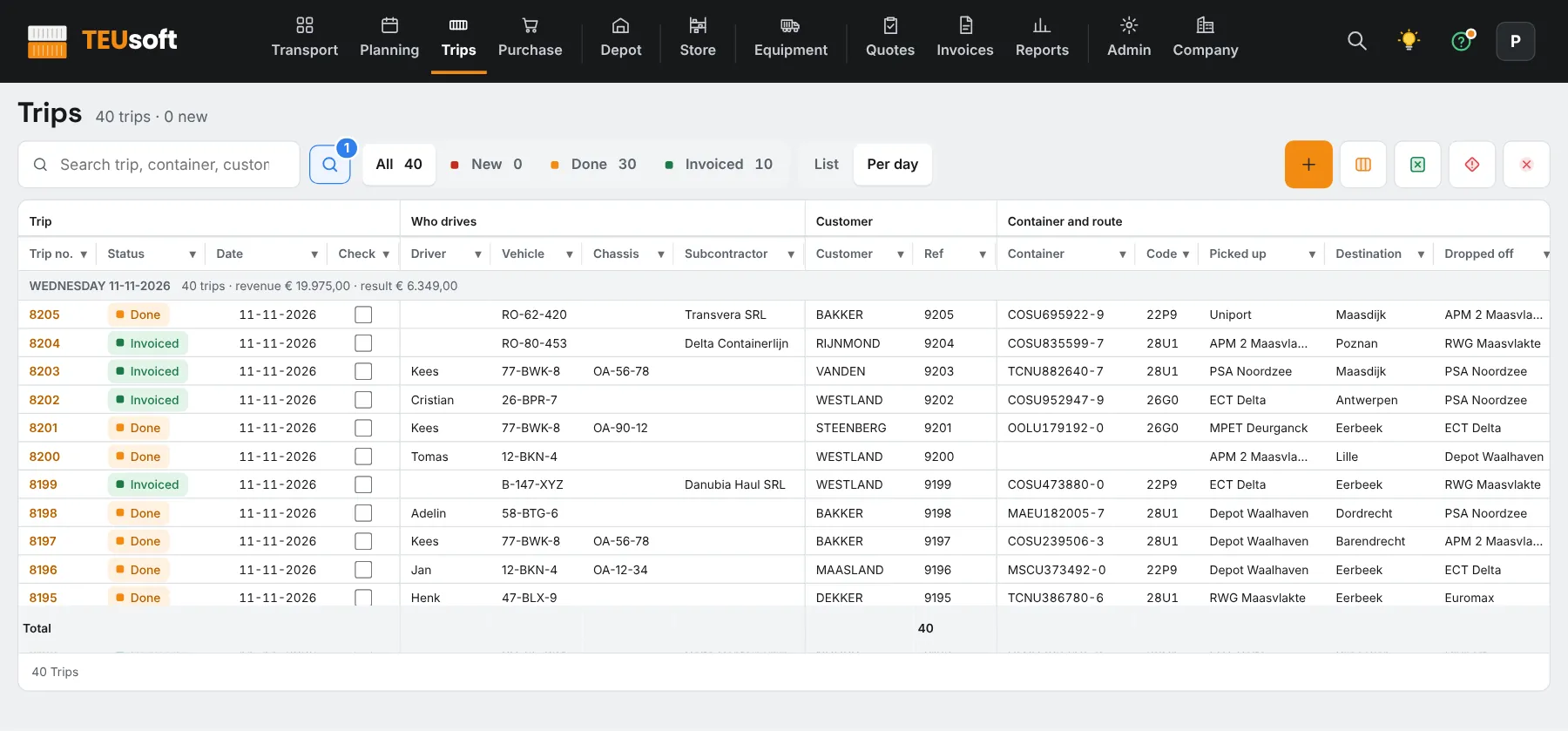
All trips with status, driver and revenue
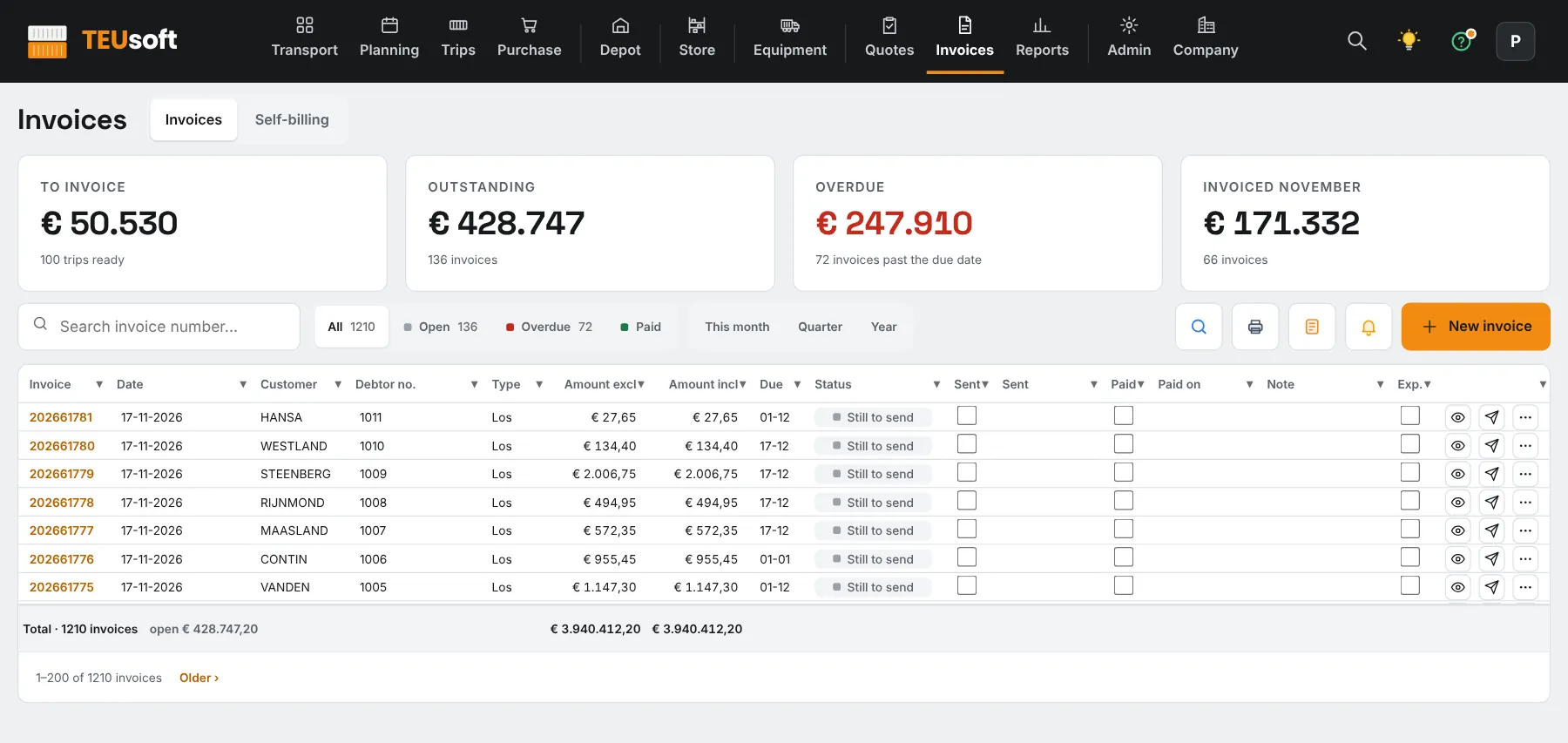
Overview of invoices
Invoices with payment status and reminders. Screens from the demo environment, with fictional data.
And more

And everything around it

Documents

CMR, weighbridge ticket and photos with the file. Email them or send them with the order.

Fleet and inspections

Your own trucks, tractors and trailers with inspections, maintenance and breakdowns.

E-invoicing

Invoices as UBL/Peppol, plus self-billing and purchase orders per subcontractor.

Integrations

Portbase, MPET, DP World, Chainfill and Avantida, with a per-integration switch for running automatically.

TEUgo in 11 languages

The driver app works on any smartphone, without an account, with photos, documents and ETA. All photos are stored in the file, also as PDF.

Idea box

One button with a light. Whatever you type comes straight to us.

A separate database per customer

Keys stored encrypted and a log of all changes.

Smooth switch

Drag your existing administration in and it's all there, trips and contacts.

Live fast

Enter a name and code and your environment is ready within minutes.

Transport orders as PDF

Drag a transport order as PDF into Trips and the data is read in for you.

Portbase outage instantly visible

If the integration fails, everyone sees it at the top of the screen. As soon as Portbase answers again, the notice disappears by itself.

Reports in your house style

Your logo and address block on your reports, set up for you by us.

Want to see how this would work for you?

We'll walk through it together with your own trips.

Request a demo